Category Lists (Domains)
Overview
In some cases, detailed application metadata isn't necessary. For example, adult content lists may contain millions of domains. Any user of the Netify agent can bring their own domain list. By creating and maintaining a domain list, the agent will attempt to pattern-match and tag flows in near real time with the associated category.
With the category ID of a flow populated, this additional information can be used with the IPset plugin.
Creating Category Lists
Categories cannot be defined arbitrarily - use one of the classifications known to Netify. To list available categories, run:
netifyd --dump-categories
     2: application: adult
     3: application: advertiser
     4: application: entertainment
     5: application: business
     6: application: education
     9: application: financial
    10: application: file-sharing
    11: application: gambling
    12: application: games
    13: application: government
    15: application: mail
    16: application: malware
    17: application: messaging
    18: application: news
    19: application: portal
    20: application: recreation
    21: application: reference
    23: application: shopping
    24: application: social-media
    26: application: sports
    27: application: technology
    28: application: vpn-and-proxy
    29: application: streaming-media
    30: application: cybersecurity
    31: application: os-software-updates
    32: application: voip
    33: application: device-iot
    34: application: remote-desktop
    35: application: cdn
    36: application: hosting
    37: application: telco
     2: protocol: database
     4: protocol: file-server
     5: protocol: file-sharing
     7: protocol: games
     9: protocol: infrastructure
    11: protocol: mail
    12: protocol: media
    13: protocol: media-provider
    14: protocol: networking
    16: protocol: proxy
    17: protocol: authentication
    18: protocol: remote-desktop
    20: protocol: voip
    21: protocol: vpn
    22: protocol: web
    24: protocol: messaging
    25: protocol: printing
For Netify deployments over 500 endpoints, custom categories are permitted. Please contact us for details.
Only application categories (those with the prefix "application: /etc/netifyd/domains.d.
In version 5, the domains.d folder was renamed to categories.d.
sudo touch /etc/netifyd/domains.d/10-adult.confFilename conventions are important.
- The filename must start with a number followed by a dash. This number determines the priority of the list; lower numbers match first.
- After the dash, include the category name in lowercase characters.
-
The filename must end in
.conf. Files not ending in.confwill be ignored; this is a simple way to enable/disable lists.
Once the file has been created, populate each line with a unique domain (wildcards are matched by default, e.g. example.com matches abc.example.com).
An example 10-adult.conf file might look like:
adultfind.comUnlike in version 5, only domains are permitted in v4 lists - IP/CIDR and regular expressions are not supported.
Making changes to the domains.d list (adding, deleting, etc.) requires the Netify Agent be notified. Restarting the agent is not necessary; instead send a HUP by running:
sudo systemctl reload netifydMemory Considerations
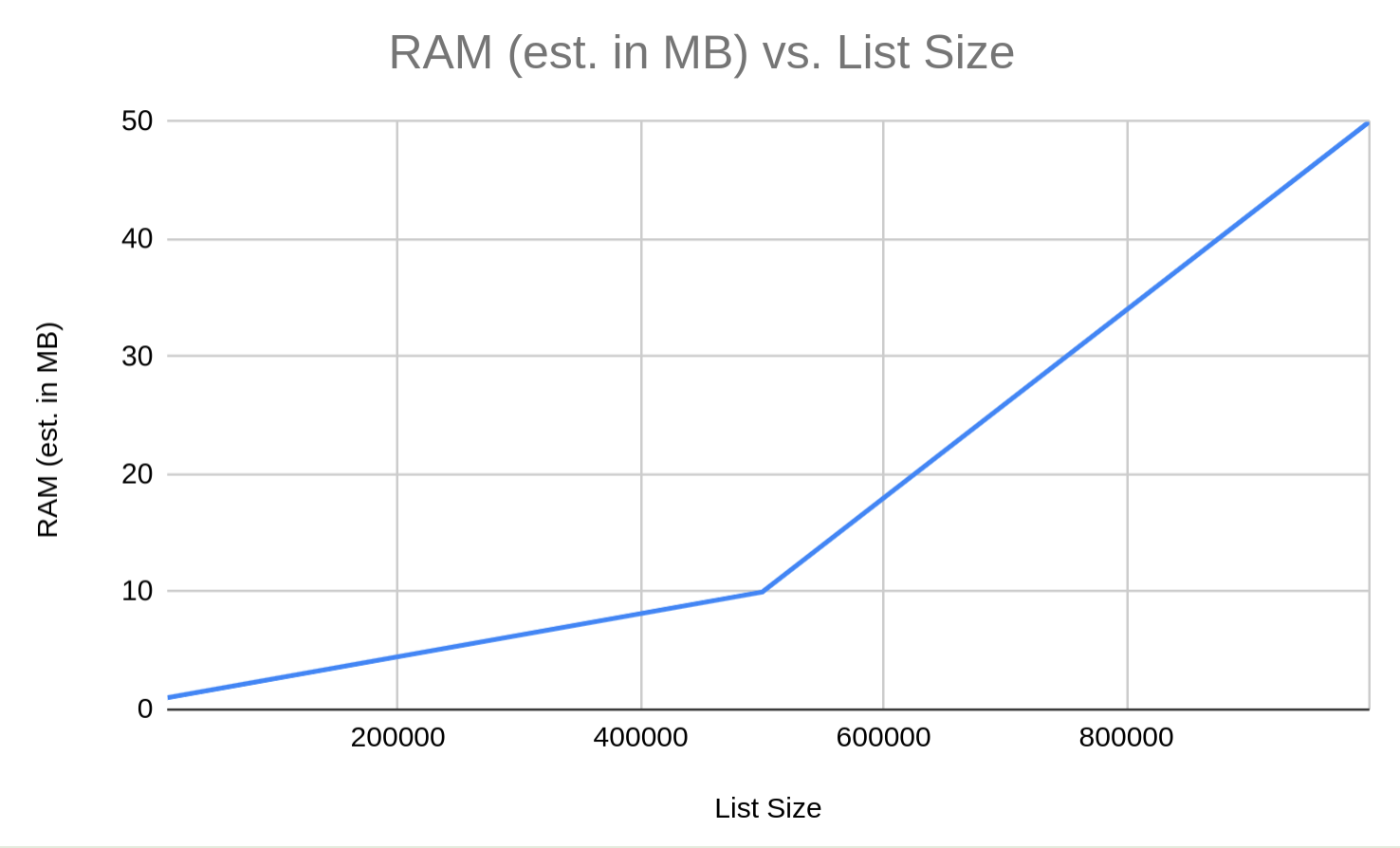
The Netify agent is not packaged with any lists - obtaining lists is the responsibility of the user or integrator. Even a relatively small list of 100,000 entries can require tens of MB of RAM, which may be acceptable on servers but unsuitable for many embedded devices.