Network Interfaces
Network interface configuration in Netify Agent v5 defines how the agent captures and monitors traffic on your network. By selecting the appropriate interfaces and capture mode, you can deploy the agent effectively whether it is installed on a gateway device, a dedicated analysis server, or a network tap.
This guide covers the different capture modes available, the underlying capture drivers, and the configuration options for each driver. Whether you are capturing traffic inline for active policy enforcement or passively analyzing mirrored traffic, proper interface configuration is essential to optimal DPI performance and accurate telemetry collection.
Once operational, the interface stats telemetry provides valuable performance data on your network hardware and DPI performance.
Network Modes
There are two primary ways to deploy a Netify Agent:
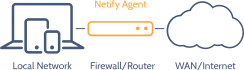
Gateway Mode
The Netify Agent can be installed on a gateway device: firewalls, routers, access points, aggregators, etc. This gateway mode provides a way to analyze what's on the network and control network traffic using the Netify Flow Actions plugin.
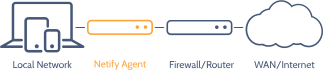
Mirror Port Mode
Sometimes referred to as a span port, mirror port mode allows you to connect a port to a standalone Netify DPI Agent if you have network switches with port mirroring capabilities. Tapping into the network in this mode allows one to analyze network traffic passively.
Drivers
The network capture can be one of three supported modes:
- pcap - PCAP
- tpv3 - TPACKETv3
- nfqueue - NFQUEUE
Promiscuous mode on the underlying network card must be enabled to see all traffic from the mirror port. Double-check the network permissions if running Netify in a container or virtual machine environment.
NFQUEUE
- Hardware Offload
- After classification, remaining traffic can be handed off to kernel fast-paths or hardware accelerators.
- Selective Inspection
- Enqueue only the start of flows for classification, greatly reducing user-space work.
- Scales with Cores
- Multiple queue workers allow higher throughput on multi-core systems.
- Low Footprint
- Suitable for embedded systems where only a small portion of traffic needs DPI.
PCAP
- Portability
- Works across most Unix-like platforms and is commonly used for troubleshooting.
- Offline Analysis
- Run Netify against pcap files from tools like tcpdump or Wireshark.
- BPF Filtering
- Reduce workload by filtering in-kernel before packets reach user-space.
- Low Friction
- Quick to get started for most environments.
TPACKETv3
- High Performance
- Zero-copy packet capture with memory-mapped ring buffers.
- Fanout Support
- Built-in load distribution across threads or processes.
- Scalability
- Designed to sustain multi-gigabit captures on commodity hardware.
- Filtering
- Supports in-kernel filtering to optimize performance.
NFQUEUE Configuration
NFQUEUE is a Netfilter target that enqueues selected packets to a userspace queue consumed by the agent via libnetfilter_queue. Netify binds to a specific queue (configured with queue_id ) and can run multiple worker threads (queue_instances ) to process packets in parallel.
Packets delivered to NFQUEUE include headers and conntrack identifiers, enabling precise DPI-based classification of the initial packets in a flow. Netify's NFQUEUE path is designed for selective inspection and hardware-friendly handoff; by default the agent's verdict is set to accept, so NFQUEUE is not used for blocking in typical deployments.
Important: Firewall Configuration Required
Unlike passive capture mechanisms (such as pcap or tpacketv3) which automatically sniff traffic from a network interface, the NFQUEUE capture plane requires explicit instruction from the system firewall to receive packets.
Because Netify listens on a specific queue ID, you must configure your firewall rules to target and route the desired traffic into that queue. Without these rules, no packets will reach the agent for inspection.
To learn how to properly route traffic using iptables or nftables, please see the Integration Guide - NFQUEUE Firewall Configuration.
Properties
capture_type
string
The packet capture driver name: nfqueue for the NFQUEUE driver.
role
string
Network role.
queue_id
integer
Queue ID.
queue_instances
integer
Number of queue worker threads.
conntrack_counters
boolean
Conntrack counters flag.
verdict
string
Default verdict.
mark
hex
Hex packet mark value applied with the configured verdict.
mask
hex
Hex bitmask used when applying mark; only bits set in the mask are updated.
address
array
Address array identifying local networks.
Example NFQUEUE Configuration
[capture-interface-nfq0]
capture_type = nfqueue
role = lan
queue_id = 0
queue_instances = 2
conntrack_counters = true
verdict = accept
mark = 0x10000000
mask = 0xf0000000
# address[0] = 11.11.110.0/24
# address[1] = 11.11.220.0/24
PCAP Configuration
PCAP captures packets via the libpcap API and is widely portable across Linux and BSD systems. It supports live capture from interfaces and offline capture files, and integrates with Berkeley Packet Filters (BPF) to limit which packets are delivered to user space. Performance depends on kernel buffering and the capture path, so PCAP is ideal for diagnostics, forensics, and lower-throughput scenarios.
Optimizations
Berkeley Packet Filters (BPF) are supported by both PCAP and TPACKETv3 drivers, providing an efficient way to control which traffic is inspected by the Netify DPI Agent. By applying a BPF filter, you can limit analysis to only the flows that matter, reducing overhead and improving performance. To enable filtering, add a filter directive to your configuration with the desired BPF expression. For guidance on writing effective filters, refer to the official BPF syntax documentation.
Properties
capture_type
string
The packet capture driver name: pcap for the PCAP driver.
role
string
Network role.
address
array
Address array identifying local networks.
filter
string
Berkeley packet filter expression.
Example PCAP Configuration File
[capture-interface-eno1]
capture_type = pcap
role = lan
# address[0] = 11.11.110.0/24
# address[1] = 11.11.220.0/24
# filter = dst port 80 or dst port 443
TPACKETv3 Configuration
TPACKETv3 (AF_PACKET) uses memory-mapped ring buffers shared between kernel and user space to enable zero-copy packet ingestion. It supports fanout modes and parallel consumers, allowing Netify to distribute packet processing across cores while avoiding unnecessary copies and context switches. This makes TPACKETv3 the preferred driver for sustained multi-gigabit capture on Linux.
For more detailed information on TPACKETv3 settings, please see the Linux Kernel Documentation.
Optimizations
The default fanout_mode is hash. In the AF_PACKET fanout mode, packet reception can be load-balanced among processes. This also works in combination with mmap on packet sockets. Currently implemented fanout policies are shown in the adjacent table.
In fanout_flags , enable defrag to preserve order. This causes packets to be de-fragmented before fanout is applied. Adding rollover option causes fanout to select next available buffer if the preferred buffer is full. One or both options are supported, simultaneously.
- hash
- hash: schedule to socket by skb's packet hash
- lb
- lb: schedule to socket by round-robin
- cpu
- cpu: schedule to socket by CPU packet arrives on
- random
- random: schedule to socket by random selection
- qm
- qm: schedule to socket by skbs recorded queue_mapping
Berkeley Packet Filters (BPF) are supported by both PCAP and TPACKETv3 drivers, providing an efficient way to control which traffic is inspected by the Netify DPI Agent. By applying a BPF filter, you can limit analysis to only the flows that matter, reducing overhead and improving performance. To enable filtering, add a filter directive to your configuration with the desired BPF expression. For guidance on writing effective filters, refer to the official BPF syntax documentation.
Properties
capture_type
string
The packet capture driver name: tpv3 for the TPACKETv3 driver.
role
string
Network role.
fanout_mode
string
The fanout mode.
fanout_flags
string
Fanout flags.
fanout_instances
integer
Number of threads to fanout.
rb_block_size
integer
Ring buffer block size. Increasing block size decreases the chance of dropped packets at the expense of consuming more system memory.
rb_blocks
integer
Number of ring buffer blocks. Multiplied by the ring buffer size, this dictates total amount of memory required to operate the ring buffer.
address
array
Address array identifying local networks.
filter
string
Berkeley packet filter expression.
Example TPACKETv3 Configuration File
[capture-interface-eth0]
capture_type = tpv3
role = lan
fanout_mode = hash
fanout_flags = defrag, rollover
fanout_instances = 2
rb_block_size = 1048576
rb_blocks = 64
# address[0] = 11.11.110.0/24
# address[1] = 11.11.220.0/24
# filter = dst port 80 or dst port 443
Configuration Guide
The /etc/netifyd/interfaces.d folder provides a place to drop network interface configuration for Netify DPI. There are several options available, but a minimal configuration requires the following:
- Interface name
- Capture driver
- Network role
Any number of configlets can be added to this folder. The folder is scanned whenever the agent is started/restarted. Dynamic changes can also be made without having to restart the agent by reloading the service.
The filename syntax is important; it will determine whether your configlet is included at runtime. The numeric portion determines the priority of parsing in the event of duplication - the lower the value, the higher the priority.
ls -l /etc/netifyd/interfaces.d/
total 4
-rw-r--r-- 1 root root 437 Mar  4 22:31 10-lan.conf
Configlet filenames dropped into the interfaces.d directory must begin with a two-digit numeric value, from 00 to 99 followed by a dash and end in '.conf' for
them to be parsed by the agent and included in the operating window on startup.
A sample interface configuration file is shown below.
[capture-interface-eth0]
capture_type = pcap
role = lan
address[0] = 11.11.110.0/24
address[1] = 11.11.220.0/24
The name of the configlet is for convenience/human consumption only. Inside the file, the ini style format organizes interface definitions by section. Any number of interfaces can be defined in one file. The section name, preceded by capture-interface- tells the Netify agent the interface to capture traffic on. For example, on a server with 5 network cards, 4 of which are being used to monitor mirror port traffic, you might have something like this:
[capture-interface-eth0]
capture_type = pcap
role = lan
[capture-interface-eth1]
capture_type = pcap
role = lan
[capture-interface-eth2]
capture_type = pcap
role = lan
[capture-interface-eth3]
capture_type = pcap
role = lan
These interface names are generated by the networking stack on the Linux/BSD kernel. To display them, two different tools are generally used. Let's start with the more modern iproute library using the command ip addr :
ip addr

1: lo:  mtu 65536 qdisc noqueue state UNKNOWN group default qlen 1000
   ..
   .
2: wlp2s0:  mtu 1500 qdisc noqueue state UP group default qlen 1000
   ..
   .
3: enxd037457c9f29:  mtu 1500 qdisc fq_codel state UP group default qlen 1000
   ..
   .
On the same system, but using the older net-tools command, ifconfig :
ifconfig

enxd037457c9f29: flags=4163  mtu 1500
        inet 10.16.16.106  netmask 255.255.255.0  broadcast 10.16.16.255
        ..
        .
lo: flags=73  mtu 65536
        inet 127.0.0.1  netmask 255.0.0.0
        ..
        .
wlp2s0: flags=4163  mtu 1500
        inet 192.168.71.128  netmask 255.255.255.0  broadcast 192.168.71.255
        ..
        .
The interface names used by Netify's network interface configuration are the first non-numbered column...ex:
- lo
- wlp2s0
- enxd037457c9f29
The key names above are a wee bit exotic due to the wireless and USB dongle being used. More typical names you might encounter are listed below:
- br-lan
- eth0
- em1
- igb0
- wg1
The role can be one of two values:
- lan
- wan
In the vast majority of cases, the lan role should be used. This includes mirror port mode. When listening to both WAN and LAN traffic on a gateway, flows that are being tracked in the connection tracking table are verified by the agent over Netlink and tagged with an internal flag. This flag surfaces as the JSON attribute ip_nat and may modify the behavior of downstream handlers. For example, Network Informatics will, by default, discard flows where ip_nat is set to true . This removes duplicate flows based on the assumption that the LAN interface is seeing the same data, reducing the size of the data storage and keeping statistics clean.
For environments where FreeBSD is the host operating system, a note about tracking NAT flows. BSD does not have an equivalent to connection tracking/Netlink. For this reason, on these platforms, we recommend listening only on LAN interfaces.
Netify's internal data structure uses a core networking concept of the two parties communicating, not as source and destination, but by:
- local
- other
The local device will be defined by the following rule order:
- ip_address[x] Defining your local IP subnets helps Netify determine a local device. A device's IP falling into any of these subnets will be considered local.
- RFC 1918 (IANA Internal IP Blocks) A device will be identified if it is assigned an IP in the private IPv4 subnets of 10.0.0.0/8, 172.16.0.0/12, or 192.168.0.0/16.
- If both devices communicating to each other are identified as local with the above rules, the one with the lower IP assigned will be assigned local.