Network Layers and Unified Classification
Netify's DPI engine tracks network traffic across four classification layers of increasing specificity:
- IP Protocol
- TCP, UDP, ICMP, etc.
- Protocol
- HTTPS, DNS, STUN, etc.
- Application
- Spotify, Proton VPN, etc.
- Intelligence
- DNS tunneling, Tor detection, etc.
Each layer is exported as an independent telemetry field, preserving the full fidelity of the metadata extracted from every flow. For integrators, this provides access to the complete classification hierarchy for policy enforcement, analytics, storage, and downstream processing. We'll cover each layer in detail later in this document.
Many dashboards, analytics platforms, and business intelligence (BI) pipelines, however, work more effectively with a single categorical value per flow. A unified classification field provides a normalized dimension spanning all four layers of the DPI engine, making it possible to aggregate IP protocols, protocols, applications, and intelligence-derived classifications within the same query, visualization, or data model. Take a look at these two charts for comparison:
Bandwidth by Application Only
This chart breaks down network traffic by the Application layer alone, with no other layer included. The unclassified slice represents traffic that has no defined value at this layer.
By definition, some network traffic simply has no associated application. mDNS protocol traffic, for example, is used to auto-discover devices on the network, so an application-layer label parallel to what you find on a mobile phone is not applicable.
This distinction matters to data scientists, security experts, and network engineers, but it's less useful to a typical end user.
Bandwidth by Classification
This chart shows the same traffic resolved across all four network layers. The traffic that appeared as unclassified in the adjacent application-only chart is accounted for by other layers:
- Generic VPN
- Resolved via the Intelligence Layer
- mDNS
- Resolved via the Protocol Layer
- ICMP
- Resolved via the IP Protocol Layer
This can be a more user-friendly way to present network traffic, but it's a mix of different layers.
The Four Layers
Let's dive into the four distinct layers. Netify's classification layers represent progressively more specific views of a network flow. Classification begins with information available at the IP layer and becomes more precise as the DPI engine identifies additional characteristics of the traffic.
Not every flow reaches the same level of classification. A flow may initially be identified only by its IP protocol, then later be associated with a protocol or a specific application as more information becomes available. Each layer therefore provides value independently while also contributing to a more complete classification of the flow.
IP Protocol
The IP Protocol layer represents the fundamental transport or control protocol associated with a flow. Examples include TCP, UDP, ICMP, and other protocols defined by the Internet protocol number standard.
This layer provides a complete view of network traffic at the IP protocol level, including traffic that may not contain an application payload or cannot be classified further by DPI. For example, ICMP traffic can be identified and represented independently, providing visibility into network control and diagnostic activity such as ping and traceroute.
For integrators, the IP protocol layer provides a consistent baseline classification for every supported flow and can be used as a fallback when more specific protocol or application identification is unavailable.
Flow Detection Lifecycle - IP Protocol
The IP protocol (flow.ip_protocol ) information is available on the first packet in the flow detection lifecycle.
IP Protocols - Packet Counts
Protocol
The Protocol layer identifies the base layer communication method detected within a flow, such as HTTPS, QUIC, DNS, or STUN. It gives integrators a consistent and structured way to understand how traffic is communicating across the networks they manage.
While the IP Protocol layer establishes the network-level foundation of a flow, the Protocol layer adds communication-level context. This provides a valuable view of traffic composition, baseline network behavior, and protocol adoption that can be incorporated into dashboards, analytics, reporting, and other integrated services.
Protocol classification is also an important step toward deeper traffic identification. Modern encrypted traffic can place many otherwise unrelated services into broad categories such as HTTPS, limiting what protocol-level visibility alone can reveal. By preserving protocol classification alongside the more specific Application and Intelligence layers, Netify gives integrators the flexibility to build progressively richer views of network activity while retaining the underlying context behind every classification.
Related Links
Flow Detection Lifecycle - Protocol
If the protocol (detected_protocol ) can be determined, it will be identified within the first 32 packets of the flow. Once detection completes, the Netify Agent emits a flow_dpi_complete message in the telemetry stream. The detection_packets field reports how many packets were actually required to reach that determination.
Protocols - Flow Counts
Application
The Application layer identifies the specific service or application associated with a flow, such as Shopify or Proton VPN. This is often the most familiar layer for a typical end user, translating network activity into the recognizable services and applications people actually use.
For integrators, application classification turns broad protocol-level traffic into meaningful service-level intelligence. This supports richer dashboards, analytics, reporting, policy, and automation while giving users a clearer view of how their network is being used.
The Application layer builds on the IP Protocol and Protocol layers, adding progressively more specific context while preserving the underlying classification information.
Related Links
Flow Detection Lifecycle - Protocol
If the application (detected_application ) can be determined, it will be identified within the first 32 packets of the flow. Once detection completes, the Netify Agent emits a flow_dpi_complete message in the telemetry stream.
Applications - Flow Counts
Intelligence
The Intelligence layer adds network context that cannot always be determined from protocol or application classification alone. Indicators such as Tor usage, VPN detection, encrypted DNS, domain fronting, and other behavioral signals reveal characteristics of a flow that may otherwise remain hidden.
For integrators, intelligence adds another dimension to traffic classification. Two flows may appear identical at the Protocol and Application layers while having very different characteristics or implications. Intelligence indicators help distinguish between them, giving integrated platforms a richer understanding of how traffic is behaving, not just which protocol or application is in use.
Unlike the other layers, Intelligence is not limited to a single classification. A flow can carry multiple indicators, adding context as additional analysis becomes available. This allows integrators to build richer views of network activity while preserving all of the protocol, application, and intelligence context associated with each flow.
Related Links
Flow Detection Lifecycle - Intelligence
Network intelligence detections can trigger at any stage of a flow's lifecycle - from the very first packet to the very last. When an intelligence event occurs, the Intelligence telemetry provides details on that detection. The flow digest can be used to correlate the event with the corresponding flow telemetry.
Intelligence - Tor and Generic VPN
A Priority-Based Classification Strategy
With the four network classification layers established, we can now define a priority-based strategy for combining them into a single, unified classification field. The goal is to recreate the user-friendly Bandwidth by Classification view introduced earlier in this document.
This unified field provides a simplified classification for visualization, reporting, and other use cases where a single value is more practical than working with multiple layers. The original telemetry fields remain unchanged and fully available, allowing integrators to retain access to the complete underlying classification data for deeper analysis, correlation, and custom processing.
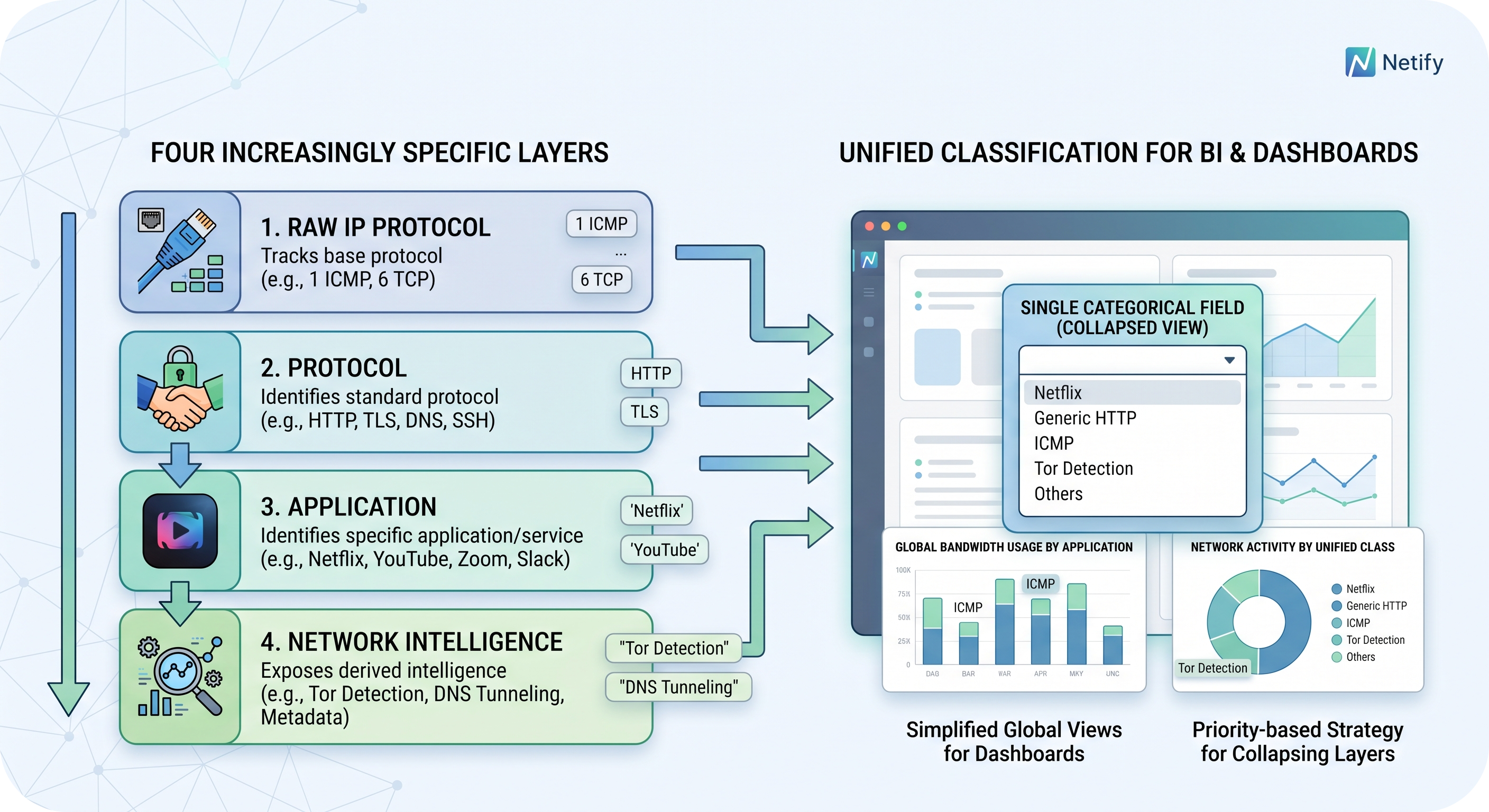
The following algorithm collapses the four network classification layers into a single field using a fallback order that prioritizes the most specific and highest-confidence classification available. A new telemetry field, classification_tag, is populated using the following algorithm:
- 1. Intelligence
- If the flow has a relevant intelligence indicator (Tor, Generic VPN) use the intel indicator tag, e.g. intel.tor_relay.
- 2. Application
- Otherwise, if an application was detected, use the application tag, e.g. app.shopify.
- 3. Protocol
- Otherwise, if a protocol was detected, use the protocol tag, e.g. protocol.mdns.
- 4. IP Protocol
- Otherwise, classify by the raw IP protocol, e.g. ip_protocoo.ospf.
- 5. Otherwise
- Otherwise, classify as other.
What constitutes a relevant intelligence classification is ultimately a policy decision for you to define. You may choose to promote only specific indicators, such as Tor or DNS Tunneling, while ignoring others, such as a self-signed TLS certificate. You will also need to define how flows with multiple intelligence indicators should be handled.
The classification strategy should therefore treat intelligence as a configurable policy rather than a fixed priority rule.
Requirements
- Install and configure the Netify Agent.
- Install and configure the Core Processor Plugin for the IP Protocol, Protocol, and Application layers.
- Install and configure the Network Intelligence Plugin for the Intelligence layer.
- Install and configure a Sink Plugin to deliver the telemetry to your classification logic.